Best Format Factory Alternatives (2026 Comparison)
Format Factory isn't the right converter for every situation. Here's how it actually compares to the tools people ask about most, and when each one is the better pick.
Format Factory vs. HandBrake
Best for video quality and encoding controlHandBrake is a free, open-source video transcoder with far deeper encoding controls than Format Factory — custom presets, detailed x264/x265 tuning, and a strong reputation for output quality. It's video-only, though: no audio, image, PDF, or disc-ripping tools, and it runs on Windows, macOS, and Linux, unlike Format Factory's Windows-only scope.
Format Factory vs. VLC
Best if you already use it as a media playerVLC is primarily a media player, but its built-in "Convert/Save" feature does basic format conversion too — genuinely useful if you already have it installed. It runs on Windows, macOS, and Linux, which makes it the practical answer to "Format Factory alternative for Mac" or "for Linux". Its conversion options are far more limited than Format Factory's dedicated toolset, though.
Format Factory vs. FFmpeg
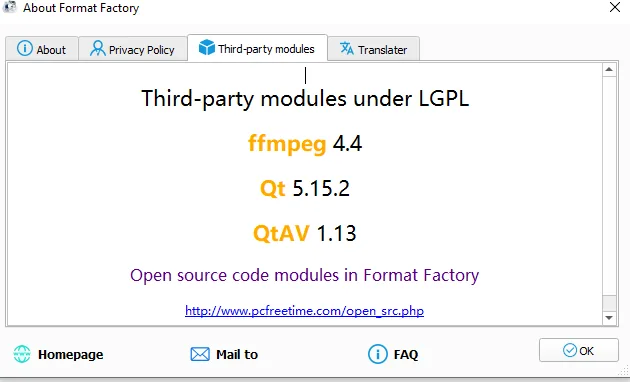
Best for full control, zero GUIFFmpeg is the command-line engine that actually powers Format Factory's conversions under the hood (the changelog credits FFmpeg 7.1 in the current build). Using it directly gives you full control with no GUI overhead at all, at the cost of a real learning curve — every conversion is a command you write yourself.
Format Factory vs. Freemake Video Converter
A closer like-for-like, with more restrictionsFreemake is another Windows-only freeware video converter with a similarly broad format list to Format Factory. The free tier has historically been more restrictive about which output formats and features are unlocked without paying, so it's worth checking Freemake's current terms directly before assuming full parity with Format Factory's free feature set.
Which one should you use?
If you're on Windows and want one app that handles video, audio, images, and documents without a learning curve, Format Factory still covers the most ground. Reach for HandBrake specifically when video quality and encoding control matter more than breadth. Reach for VLC if you're on macOS or Linux, or already have it open. Reach for FFmpeg directly if you're comfortable with a terminal and want zero GUI overhead. All three are open-source, which is worth factoring in if that matters to you specifically — Format Factory is free to use but is not open-source software.
What actually decides which one to pick
Platform
Format Factory and Freemake are Windows-only. HandBrake, VLC, and FFmpeg all run on macOS and Linux too — the deciding factor if you're not on Windows.
Breadth vs. depth
Format Factory covers video, audio, image, and document conversion in one app. HandBrake and FFmpeg go deeper on video specifically but don't touch the other categories at all.
Learning curve
Format Factory, HandBrake, VLC, and Freemake are all GUI-first and approachable for a first-time user. FFmpeg has real command-line overhead in exchange for the most granular control of the group.
More comparison questions
Is there a single "best" Format Factory alternative?
Not universally — it depends entirely on what you value. HandBrake wins on video quality control, VLC wins on cross-platform convenience if you already have it installed, and FFmpeg wins on raw power for anyone comfortable with a terminal. There isn't one tool that beats Format Factory on every axis at once, which is exactly why it still has a place for people who want breadth over specialization.
Are any of these alternatives paid?
HandBrake, VLC, and FFmpeg are all free and open-source with no paid tier at all. Freemake's free tier has historically carried more restrictions than Format Factory's — verify its current terms directly rather than assuming parity.
Can I use more than one of these together?
Plenty of people do — Format Factory for everyday, broad-format conversions, and HandBrake or FFmpeg specifically when a particular video needs finer encoding control. There's no conflict in having more than one converter installed at once.
What you'd actually give up by switching
Beyond the format-by-format comparison above, it's worth naming the practical tradeoff plainly: switching away from Format Factory to a specialized tool means going back to separate apps for separate jobs — a video tool, a different audio tool, something else again for documents. That fragmentation is exactly what Format Factory's single-app approach avoids, and it's the real reason "best alternative" doesn't have one universal answer. The right call depends on whether you value having one tool that does everything acceptably, or several tools that each do one thing better.
Moving your workflow to a different tool
If you do decide to switch, none of these alternatives can import Format Factory's settings or presets directly — each has its own configuration system, so expect to rebuild any custom output profiles from scratch. The upside is that none of them lock you in either; installing HandBrake or VLC alongside Format Factory, rather than instead of it, costs nothing and lets you compare results on your own files before committing to a full switch.
One-line summary of each
HandBrake: deepest video encoding control, cross-platform. VLC: convenient if you already have it as a player, cross-platform. FFmpeg: maximum power, command-line only. Freemake: closest like-for-like, more free-tier restrictions. Format Factory: broadest single-app coverage, Windows only.
This comparison will keep evolving
Every tool on this page keeps shipping updates of its own, so a comparison written today can shift over time — FFmpeg's codec support, HandBrake's presets, and Format Factory's own feature set have all changed meaningfully over just the past few years. We'll keep revisiting this page as those tools evolve rather than treating it as a one-time snapshot.