Is Format Factory Safe to Use? (Virus, Adware & Privacy Explained)
Search this question and you'll find years of mixed answers. Instead of repeating someone else's opinion, we installed the current build, read the developer's own legal text, and tested it against Windows Defender ourselves.
Is Format Factory a virus?
No — but the honest answer has one real caveat worth stating plainly. We ran the official installer through Windows Defender before running it, and in this one test, on this one machine, Defender flagged it as potentially unwanted software during a file-hash check. No specific threat name was ever logged, and we couldn't reproduce a detailed detection record afterward.
More importantly: installing and using the app produced no malicious behavior we could observe. We converted a real PNG screenshot to JPG — the task finished in about a second, with a normal Windows completion notification and no unexpected pop-ups, extra installers, or browser hijacking. This kind of heuristic flag is consistent with how some antivirus engines react to freeware that bundles a third-party SDK (see the EULA finding below) — it's a real result we're reporting as-is, not evidence of actual malware.
The Bright Data network clause
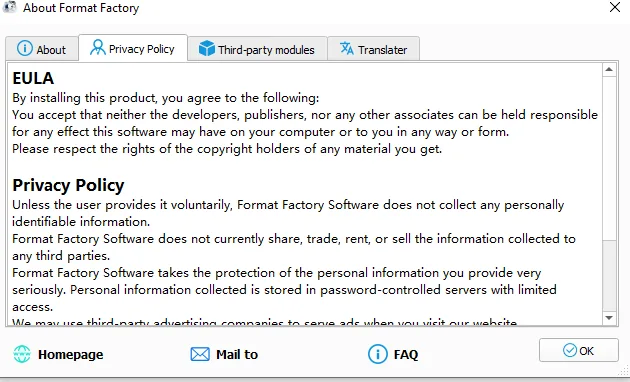
The developer's Privacy Policy — the same text appears both on their website and inside the app's own “About” dialog — discloses something worth knowing before you install:
“In return for some of the premium features of Format Factory, you may choose to be a peer on the Bright Data network. By doing so you agree to have read and accepted the Terms of Service of the Bright SDK EULA [...] You may opt out of the Bright Data network by clicking option in toolbar.”
Bright Data (formerly Luminati) runs a commercial residential-proxy network — in plain terms, opting in can turn your connection into a relay node for that network in exchange for premium features. The text says it's opt-in and reversible from an “Option” screen. In our own review of the installed app, we went through both Options tabs and the Modules dialog in full and could not find a control explicitly labeled for this — worth flagging honestly, since it means the opt-out isn't easy to locate by browsing the interface normally, whatever the legal text says.
Is there a paid 'Pro' version? No — beware fake keys
There is no separate paid tier of the application itself. The core program — every video, audio, image, and document tool — is free for personal and commercial use, with no license key required, per the developer's own “About” text. The one real exception lives inside the in-app Modules manager: an AI voice/music separator called SplitMusic is sold at a “Platinum” tier, purchased from inside the app.
Because that's the only paid item, any third-party site offering a Format Factory “license key”, “Pro version crack”, or “premium unlock” for the whole app is selling something that doesn't match how the software actually works. Treat those offers as suspicious by default.
How to avoid bundled offers
Download only from the official link (public.pcfreetime.com) — see our download page for the exact URL and file size to verify.
During setup, read each installer screen instead of clicking through — the version we tested didn't bundle third-party toolbars, but it's good practice with any freeware installer.
If you want to opt out of the Bright Data network mentioned above, check every screen under Options and the Modules dialog carefully; we couldn't locate a dedicated toggle in this build despite the EULA describing one.
Get the installer from the developer's own domain rather than a repackaged download-manager wrapper from a third-party site — those wrappers are a much more common source of real bundled adware than the original installer.
Our honest conclusion
Format Factory is not malware, and our own end-to-end conversion test showed normal, expected behavior. But it isn't spotless either: a real (if unreproduced) Defender flag on one test machine, and a Bright Data opt-in clause whose opt-out control we couldn't easily find, are both worth knowing before you install — not reasons to avoid the app outright, but good reasons to download from the official source, read the setup screens, and decide for yourself with full information rather than someone else's one-line verdict.
More safety questions
Does Format Factory collect personal data?
The Privacy Policy we reviewed doesn't describe collecting personally identifiable information without you providing it directly, and states it isn't sold to third parties. The one exception worth flagging is the Bright Data network clause above — that's a bandwidth/connection-sharing arrangement tied to premium features, not data collection in the traditional sense, but it's adjacent enough that we're mentioning it again here rather than letting a narrow reading of "personal data" hide it.
Is the developer trustworthy long-term?
Format Factory has a genuinely long track record — the changelog stretches back to an initial 2007 release and a first "official" version in 2008, with active updates continuing through the current 5.22.0.0 build. Longevity isn't a safety guarantee by itself, but a freeware project actively maintained for close to two decades is a meaningfully different situation than an anonymous tool that appeared last month.
Should I use it for sensitive or confidential files?
For most personal use — family photos, home videos, routine documents — nothing we found suggests a specific risk. For genuinely sensitive material (legal documents, confidential business files), the Bright Data opt-in clause and the unreproduced Defender flag are exactly the kind of open questions that would make us personally lean toward a tool with a fully transparent, open-source codebase instead, where every line of behavior can be audited rather than taken on trust.