Format Factory System Requirements & Windows Compatibility
One page covering every version question: is it 64-bit only, which Windows versions work, and what to do if your PC or laptop is on an older setup.
Is Format Factory 64-bit only?
Yes, as of version 5.0.0 (February 2020). Every release since, including the current 5.22.0.0, only installs on 64-bit Windows. If you're specifically on a 32-bit copy of Windows, the last release that supports it is the older v4.10.5.0, distributed separately from the current build.
PC vs. laptop, minimum specs
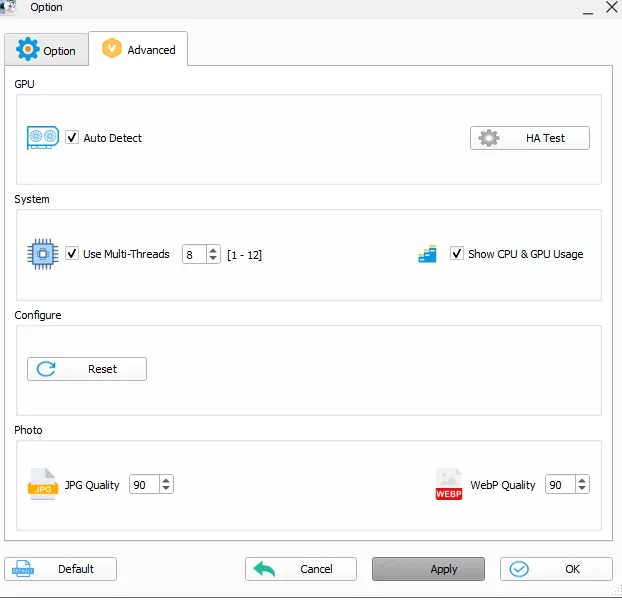
Format Factory doesn't publish a formal minimum-hardware spec, and any Windows PC or laptop running a supported 64-bit Windows version can install it. The ~163 MB installer is small; actual conversion speed depends on your CPU and, for hardware-accelerated encoding, whether your GPU (Intel, AMD, or NVIDIA) supports it — the app includes a built-in HA Test tool that checks this for you.
Version-by-version breakdown
Windows XP and non-Windows platforms
Support for Windows XP was dropped in version 4.40 (September 2018) — there is no way to run a current build of Format Factory on XP. The application is also Windows-only in general: there is no official version for macOS, Linux, Android, or iOS, and no legitimate way to get one.
If you specifically need Windows 7, Windows 11, an Android alternative, or a Mac/Linux option, see the dedicated pages below — each covers that exact situation with its own install steps or alternative recommendation.
RAM, disk space, and what actually affects performance
The developer doesn't publish a formal minimum RAM or CPU spec anywhere we could find, and we're not going to invent one — treat any number you see quoted elsewhere with the same skepticism. What we can say from direct testing: the ~163 MB installer itself is small, and a basic image conversion completed in about a second on ordinary consumer hardware. What actually matters more than raw specs is whether your CPU or GPU supports hardware-accelerated encoding for the format you're converting — Intel Quick Sync, NVIDIA NVENC, and AMD's equivalent are all things the app checks for automatically.
For disk space, budget for the installer itself plus room for your output files — video conversions in particular can produce files comparable in size to (or larger than) the source, depending on the codec and bitrate you choose. The default output folder is C:\FFOutput, which you can redirect to a drive with more free space from the app's Options screen if your system drive is tight.
Common compatibility questions
Does it run in a virtual machine?
We haven't specifically tested Format Factory inside a VM, so we won't claim it works flawlessly — in principle, any 64-bit Windows guest OS that meets the requirements above should behave the same as physical hardware, though hardware-accelerated encoding may not pass through depending on your hypervisor's GPU support.
Will a Windows feature update break it?
We haven't observed a Windows Update breaking an existing Format Factory install. Since the app isn't a system-level driver or shell extension, ordinary feature updates are unlikely to affect it, though it's always sensible to re-run the installer if something stops working after a major Windows update.
Does a laptop's battery-saving mode slow conversions?
Windows power plans that throttle CPU/GPU performance to save battery will slow down any CPU-intensive task, conversion included. If a large batch job is taking longer than expected on a laptop, plugging in and switching to a balanced or high-performance power plan is worth trying before assuming something is wrong with the app itself.
How to check your exact Windows version
Press Windows key + R, type winver, and press Enter — this shows your exact Windows edition and build number in a small dialog, faster than digging through Settings. Combined with the "System type" field under Settings → System → About (for confirming 32-bit vs. 64-bit), that's the complete picture you need before downloading: which Windows version, and which architecture.
Dual-boot and multiple Windows installs
If you dual-boot two different Windows versions — say, Windows 10 on one partition and Windows 11 on another — you'll need to install Format Factory separately on each, since installed applications don't carry across separate OS installs the way files on a shared data drive do. Both installs use the exact same 64-bit installer and behave identically once set up, based on our testing across the supported version range.
The one rule that covers most compatibility questions
If there's a single fact to remember from this page, it's this: 64-bit Windows 7, 8, 10, or 11 all work with the current build; anything else — 32-bit Windows, Windows XP, macOS, Linux, Android, or iOS — doesn't, without exception we could confirm. Every other question on this page is a variation of that same underlying rule applied to a specific situation.
When specs alone don't tell the whole story
Meeting the OS and architecture requirements above guarantees the app will install and run — it doesn't guarantee every feature performs identically across every machine. Hardware-accelerated encoding, in particular, varies meaningfully by CPU/GPU generation even within the same supported Windows version, which is exactly why we keep pointing back to the built-in HA Test tool rather than a single blanket answer.
The practical takeaway
Check your architecture, check your Windows version, and everything else on this page is detail rather than a blocker for the vast majority of readers.