Format Factory FAQ: What It Is, Who Makes It, and How It Works
The brand and company questions people actually ask — what it is, who builds it, and whether it's the real thing — answered directly.
Format Factory is a free Windows application that converts video, audio, image, and document files between formats — MP4, MP3, JPG, PDF, and dozens more. It's been in development since 2007, currently shipping as version 5.22.0.0, and also includes editing extras like video joining, cropping, and watermark removal.
The developer is "Free Time" — legally Free Time Software Technology Co., Ltd., according to the app's own "About" dialog. Public sources, including the developer's contact email and Wikipedia, attribute the software to Chen Jun Hao.
Freeware installers commonly register under internal or historical company/publisher metadata that doesn't match the app's public brand name — this isn't unique to Format Factory. If you want to confirm what you installed is genuine, check the installer's digital signature properties and compare the version number against our download page rather than relying on the publisher field alone.
No. Format Factory is desktop-only Windows software — conversion runs locally on your PC, not through a browser or server. Any site calling itself an "online Format Factory converter" is a different, unrelated tool, not the real application.
Yes — it's real, actively maintained freeware with a changelog stretching back to 2007 and a legitimate developer. That said, our own testing found a few things worth knowing before you install; see our full safety write-up for the honest details rather than a one-line yes.
Yes, for the entire core application — every video, audio, image, and document tool — with no license key, for personal or commercial use. The one paid item is an optional add-on module called SplitMusic, sold separately inside the app's Modules manager.
Format Factory dropped 32-bit support starting with version 5.0.0 in February 2020. If you're still on 32-bit Windows, the last compatible release is the older v4.10.5.0, distributed separately from the current build.
No. It's Windows-only, with no official app for Android, iOS, macOS, or Linux. Any "Format Factory APK" you find online isn't from the real developer.
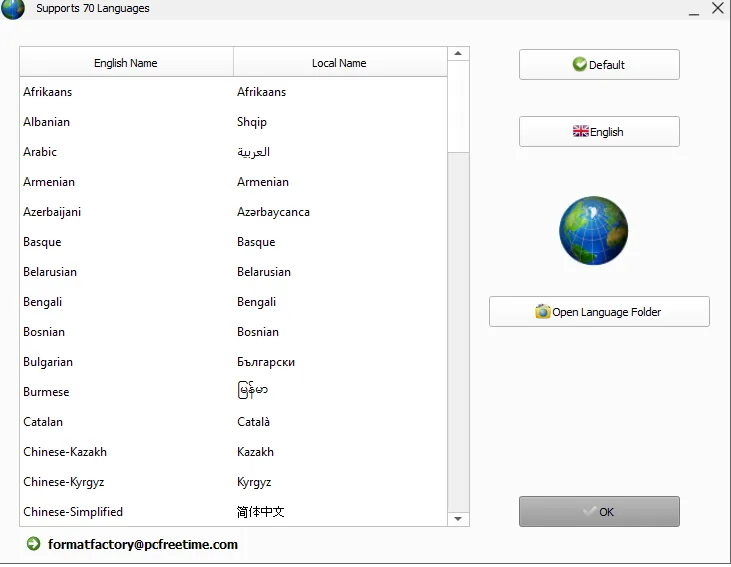
70, according to the app's own "Select more languages" dialog — more than the developer's website (62) or Wikipedia (66) currently claim. The interface also auto-detects your Windows display language automatically on first launch.
No — conversion runs entirely offline on your PC. You only need a connection to download the installer, check for updates, or fetch an optional module like the DVD ripper the first time you use it.
An online converter uploads your file to someone else's server, converts it there, and sends it back — which means your file leaves your machine and you're trusting that server with it. Format Factory runs the entire conversion locally on your own PC, so nothing you convert is ever uploaded anywhere.
The developer's Privacy Policy mentions using third-party advertising companies on their website, but we didn't observe intrusive in-app advertising during our own installation and conversion testing beyond what's already covered in our safety write-up.
Yes — the developer's own "About" text explicitly permits use "for any purpose, including commercial applications," with no license key required for the core application.
The developer lists two addresses we found during testing: [email protected], shown inside the app's own language dialog, and [email protected], listed on the developer's website.
No — Format Factory, developed by Free Time Software Technology Co., Ltd., is a distinct product. Similarly-named tools from other publishers are not affiliated with it, and any app claiming to be an official Format Factory mobile version specifically is not from this developer.
No — the application runs entirely locally with no account creation, sign-in, or registration step required for the core features, confirmed during our own installation and testing.
It describes what the software does at its core — taking files in one format and producing them in another, at scale, across video, audio, image, and document types, like a factory line for file formats.
Yes — the app's own "Third-party modules" tab credits FFmpeg, Qt, and QtAV under LGPL licensing, and the changelog confirms FFmpeg specifically powers the encoding engine, most recently updated to FFmpeg 7.1.
Based on our testing, there's no license server check or periodic re-verification for the core application — once installed, conversion works offline indefinitely without needing to phone home.
Yes — that's precisely who it's built for. If you convert files daily as part of a professional workflow, a specialized tool suited to that specific task will usually serve you better than a broad, general-purpose converter like this one.
Direct installation and testing of the current 5.22.0.0 build, the developer's own in-app About and Privacy Policy dialogs, and the official changelog — not secondhand summaries. Where we couldn't verify something ourselves, we've said so explicitly rather than guessing.