Download Format Factory (Official, Free)
One canonical link, the exact byte size to check it against, and what to watch out for on the way. We downloaded this build ourselves before publishing this page.
Opens pcfreetime.com over HTTPS — the developer's own site.
Direct installer link ↓
Points straight at the developer's server, which only serves this file over HTTP. Your browser may warn about an "insecure download" — that's the transport, not the file.
FFSetup5.22.0.0.exe · ~163 MB · 64-bit Windows 7 / 8 / 10 / 11
Why this specific link, and not the button on pcfreetime.com
The developer's own homepage links to download.pcfreetime.com, but that subdomain currently doesn't resolve to a working server. The link that actually works — the one above — is public.pcfreetime.com/FFSetup5.22.0.0.exe, found by testing the developer's own infrastructure directly. It returns a normal 200 OK with a Content-Length of 170,588,782 bytes.
One honest caveat: the developer's server is slow. In our own tests it sustained only about 6–9 KB/s regardless of connection or user-agent, which is a real limitation of their hosting, not a block aimed at any particular visitor — at that rate the full ~163 MB can take several hours over a raw connection, so downloading through a browser (which handles retries and resuming automatically) works far better than a single command-line request. Third-party mirrors like FossHub, CNET, and Softpedia mostly redirect back to pcfreetime.com rather than hosting the binary themselves, so they don't avoid the slowdown either.
There is no official portable build
A lot of people search for a “Format Factory portable” zip they can run without installing. As far as we could verify, the developer only distributes a standard Windows installer — FFSetup5.22.0.0.exe — through their own site. We didn't find an official portable package anywhere in the developer's own downloads or changelog. Any “portable” or “.rar” build offered on a third-party site is unofficial and unverified; treat it the same way you'd treat any executable from a source you can't confirm.
Is it really free?
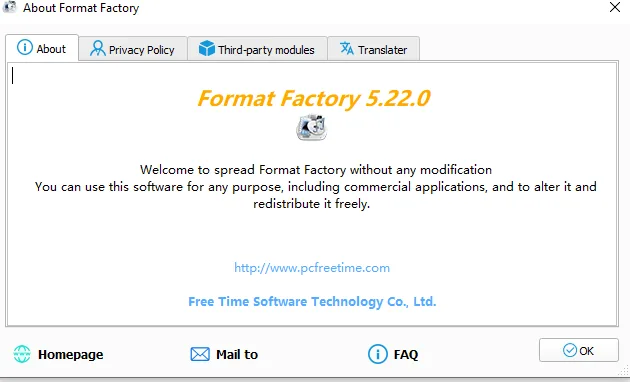
Yes, for everything most people came here for. Format Factory's own “About” text states you may use it “for any purpose, including commercial applications”, with no license key. Opening the in-app Modules manager shows exactly where the one exception sits:
Safe-download checklist
Download from public.pcfreetime.com (the link on this page) — the developer's own "download.pcfreetime.com" button currently fails to resolve to a live server.
Confirm the file size after downloading: 170,588,782 bytes exactly, verified against the server's own Content-Length header.
Skip any site that wraps the installer in its own "download manager" or asks you to install a browser extension first.
Don't buy a "license key", "Pro version", or "premium unlock" from a third-party site — the only paid item is the in-app SplitMusic module, purchased from inside the app itself.
Run a scan with your own antivirus after downloading. In our own test, Windows Defender flagged the installer as potentially unwanted software during a hash check with no behavior logged — see our full write-up on whether Format Factory is safe.
After you click download
Most browsers will show their own download-progress indicator and, on first run of an unfamiliar executable, may show their own separate warning before Windows SmartScreen does — Chrome and Edge both flag less-common downloads by file reputation, independent of anything Windows itself does later. Neither warning is a verdict on Format Factory specifically; both are generic heuristics that trigger for any installer without a large download history on that particular browser's reputation service yet.
Once the file finishes downloading, right-click it, choose Properties, and check the Digital Signatures tab if you want to confirm who actually signed the executable before running it — a step worth taking with any freeware installer, not just this one.
Common download questions
Can I download it on my phone and transfer it to my PC?
Yes — the .exe file itself doesn't care how it arrives on your Windows PC. Downloading it on a phone and transferring it over USB, cloud storage, or email works fine, though it's simpler to just open the download link directly on the Windows machine you'll actually install it on.
What if the download stalls or fails partway through?
Given how slow the developer's own server can be (see above), a stalled download is more likely bandwidth-related than a real error. Most browsers support resuming a paused download automatically — if yours doesn't, simply restarting the download is the more reliable fix than trying to patch a partial file.
How long does the ~163 MB download actually take?
It depends entirely on your connection and, some days, on how busy the developer's server is. Our own tests measured sustained speeds as low as 6–9 KB/s directly against their infrastructure, which would stretch a ~163 MB file out to several hours in the worst case — on a normal home connection when the server isn't struggling, it's typically a much faster, unremarkable download.
Confirming your download matches ours
Beyond just checking the file size, you can compute a hash of your downloaded file and compare it against what the official server reports. Right-click the file in File Explorer isn't enough for this — open a terminal and run certutil -hashfile FFSetup5.22.0.0.exe SHA256 from the folder containing the download. While we can't publish a fixed hash here since the developer occasionally patches a build without changing the version number, matching file sizes exactly (170,588,782 bytes) combined with downloading from the official domain gives you strong practical confidence the file wasn't tampered with in transit.